> ## Documentation Index
> Fetch the complete documentation index at: https://docs.pocketenv.io/llms.txt
> Use this file to discover all available pages before exploring further.
# Quickstart
> Install the CLI, log in, and run your first sandbox in under 5 minutes.
## Install the CLI
```bash theme={"theme":{"light":"catppuccin-latte","dark":"laserwave"}}
npm install -g @pocketenv/cli
```
```bash theme={"theme":{"light":"catppuccin-latte","dark":"laserwave"}}
brew install pocketenv-io/tap/pocketenv
```
```bash theme={"theme":{"light":"catppuccin-latte","dark":"laserwave"}}
curl -fsSL https://cli.pocketenv.io | bash
```
```bash theme={"theme":{"light":"catppuccin-latte","dark":"laserwave"}}
bun install -g @pocketenv/cli
```
```bash theme={"theme":{"light":"catppuccin-latte","dark":"laserwave"}}
pnpm add -g @pocketenv/cli
```
```bash theme={"theme":{"light":"catppuccin-latte","dark":"laserwave"}}
nix profile install github:pocketenv-io/pocketenv
```
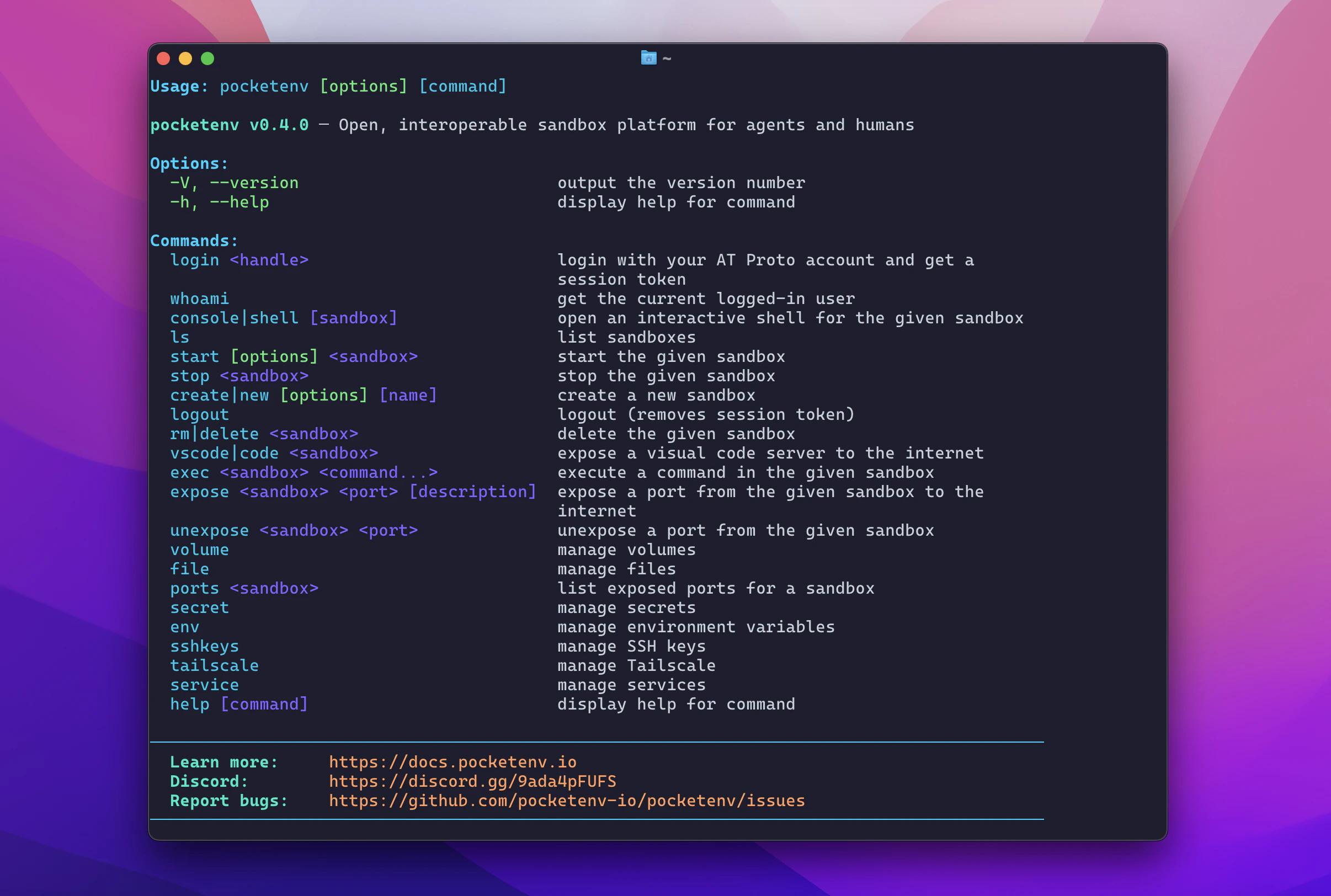
Verify the installation:
```bash theme={"theme":{"light":"catppuccin-latte","dark":"laserwave"}}
pocketenv --version
```
 ## Log in
Pocketenv uses your AT Protocol handle (e.g. a Bluesky account) for authentication.
```bash theme={"theme":{"light":"catppuccin-latte","dark":"laserwave"}}
pocketenv login alice.bsky.social
```
This opens a browser window to complete the OAuth flow. Once done, your session token is saved to `~/.pocketenv/token.json`.
For CI/CD environments, skip the browser flow by setting the `POCKETENV_TOKEN` environment variable instead.
## Create a sandbox
```bash theme={"theme":{"light":"catppuccin-latte","dark":"laserwave"}}
pocketenv create
```
By default this uses the `cloudflare` provider and the `openclaw` base image — a minimal Linux environment with openclaw and common dev tools pre-installed.
Specify a different provider or base:
```bash theme={"theme":{"light":"catppuccin-latte","dark":"laserwave"}}
pocketenv create my-sandbox --provider daytona --base openclaw
```
## Run a command
```bash theme={"theme":{"light":"catppuccin-latte","dark":"laserwave"}}
pocketenv exec my-first-sandbox "echo hello from the sandbox"
# hello from the sandbox
```
## Open an interactive shell
```bash theme={"theme":{"light":"catppuccin-latte","dark":"laserwave"}}
pocketenv console my-first-sandbox
```
This drops you into a live SSH session inside the sandbox. Type `exit` to return to your local terminal.
## Start, stop, and delete
```bash theme={"theme":{"light":"catppuccin-latte","dark":"laserwave"}}
pocketenv stop my-first-sandbox # Stop the sandbox
pocketenv start my-first-sandbox # Resume it later
pocketenv rm my-first-sandbox # Delete permanently
```
## Next steps
Configure Daytona, Vercel, E2B, Modal, and more.
Make your sandbox services accessible from the internet.
Store credentials and configuration securely.
Use Pocketenv programmatically from TypeScript/JavaScript.
## Log in
Pocketenv uses your AT Protocol handle (e.g. a Bluesky account) for authentication.
```bash theme={"theme":{"light":"catppuccin-latte","dark":"laserwave"}}
pocketenv login alice.bsky.social
```
This opens a browser window to complete the OAuth flow. Once done, your session token is saved to `~/.pocketenv/token.json`.
For CI/CD environments, skip the browser flow by setting the `POCKETENV_TOKEN` environment variable instead.
## Create a sandbox
```bash theme={"theme":{"light":"catppuccin-latte","dark":"laserwave"}}
pocketenv create
```
By default this uses the `cloudflare` provider and the `openclaw` base image — a minimal Linux environment with openclaw and common dev tools pre-installed.
Specify a different provider or base:
```bash theme={"theme":{"light":"catppuccin-latte","dark":"laserwave"}}
pocketenv create my-sandbox --provider daytona --base openclaw
```
## Run a command
```bash theme={"theme":{"light":"catppuccin-latte","dark":"laserwave"}}
pocketenv exec my-first-sandbox "echo hello from the sandbox"
# hello from the sandbox
```
## Open an interactive shell
```bash theme={"theme":{"light":"catppuccin-latte","dark":"laserwave"}}
pocketenv console my-first-sandbox
```
This drops you into a live SSH session inside the sandbox. Type `exit` to return to your local terminal.
## Start, stop, and delete
```bash theme={"theme":{"light":"catppuccin-latte","dark":"laserwave"}}
pocketenv stop my-first-sandbox # Stop the sandbox
pocketenv start my-first-sandbox # Resume it later
pocketenv rm my-first-sandbox # Delete permanently
```
## Next steps
Configure Daytona, Vercel, E2B, Modal, and more.
Make your sandbox services accessible from the internet.
Store credentials and configuration securely.
Use Pocketenv programmatically from TypeScript/JavaScript.